How a GPU Works
Two kilos of cooler wrapped around a fingernail of silicon that runs the same instruction on thirty-two numbers at once — a hundred and ninety thousand times over.
Step 01 of 10
1 · Two kilos to cool a fingernail
A high-end graphics card is 330 millimetres long, three expansion slots thick, and heavy enough that most people prop it up with a strut so it does not sag in the case — over two kilos of it. Almost none of that is the computer. Three 100 mm fans, a plastic shroud and a metal backplate are wrapped around a block of aluminium whose only job is to carry heat away from one square of silicon smaller than a postage stamp. The card pulls 450 watts, and every one of them leaves again as warm air.
Step 02 of 10
2 · Lift the cooler off
Take the shroud and the fans away and the reason for all that mass appears. The fans blow straight down through 96 aluminium fins packed three millimetres apart, threaded by six copper heatpipes, and those fins stand on a vapour chamber — a sealed plate with a little fluid sealed inside that boils where the chip is and condenses at the cool end, moving heat sideways far faster than solid metal could. On its underside a raised pad presses onto the chip itself. Nothing is in the way: unlike a processor, a graphics chip has no metal lid, and the cooler lands on naked silicon.
Step 03 of 10
3 · The board underneath
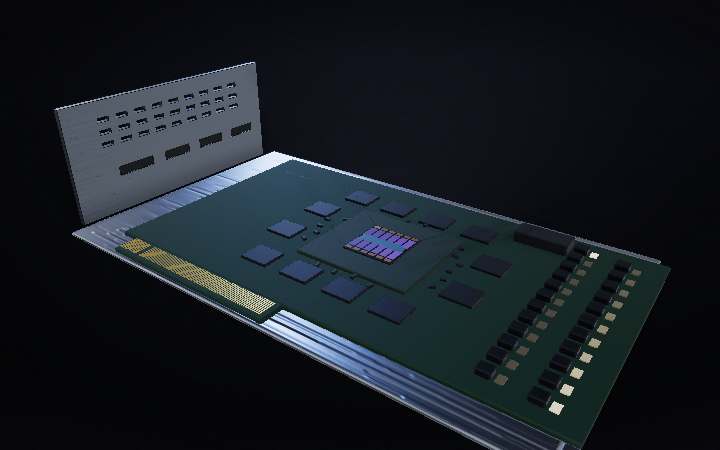
The board itself is barely two-thirds the length of the cooler hanging off it. In the middle sits the processor: a green package carrying one uncovered rectangle of silicon, 24.7 millimetres on a side. Ringed around it are twelve memory chips of 2 GB each. Along the far edge, twenty-three power stages take twelve volts from that single sixteen-pin plug and step it down to about one — because at one volt, this much power means more than three hundred amps, and no single stage could carry it.
Step 04 of 10
4 · What all of it is actually for
Here is the job the whole machine is shaped around. A 3D scene is millions of triangles. For each one the card takes its three corners and works out where they land on your screen; then it asks which pixels that triangle covers; then it runs a small program — once — for every single covered pixel, to decide what colour it should be. At 4K there are 8.3 million pixels in a frame. And the important part is the last one: no pixel needs to know what its neighbour came out as. All of them can be worked out at the same instant.
Step 05 of 10
5 · So you build a field of small cores
Which is why this chip looks nothing like a processor. Instead of eight large cores it carries 144 identical tiles, called streaming multiprocessors, arranged in twelve groups of twelve, with a 96 MB band of shared L2 cache running between the rows and twelve memory controllers along the rims. A CPU core is built to finish one difficult job as quickly as anything can. These are built to be numerous. Not all of them survive: on a die this big some tiles always come out flawed, so the finished card ships with 128 of the 144 switched on — and 72 of those 96 megabytes.
Step 06 of 10
6 · Inside one tile
Blow a single one of those tiles up and it is a small machine in its own right. 128 arithmetic lanes, divided into four blocks of 32, each block with its own scheduler feeding it instructions. Along the bottom, 128 KB of fast memory the whole tile shares. Down the left, a file of registers — 256 KB of them, an absurd amount of scratch space for 128 lanes, and the reason for that is the whole point of the next two steps. Off to the side sit the specialists: four tensor cores for matrix arithmetic, one core that does nothing but trace rays.
Step 07 of 10
7 · One instruction, thirty-two lanes
A block does not run 32 separate programs. It runs ONE instruction across all 32 lanes at once, on 32 different pixels. That group of 32 has a name — a warp — and it moves in lockstep. This is the efficiency at the heart of the whole chip: one instruction fetched, one decoded, thirty-two answers. It is also the catch. When a branch in the shader sends some lanes one way and the rest the other, the block cannot do both at once. It runs the first half with the other lanes switched off, then runs the second half. The same work, taking twice as long.
Step 08 of 10
8 · The real trick is never waiting
Fetching a number from memory costs hundreds of clock cycles, and 32 lanes sitting still through every one of them would waste most of the chip. So the tile keeps up to 48 warps loaded at the same time — 1,536 threads — and the instant one of them asks memory for something, the scheduler issues a different warp’s next instruction on the following cycle. Nothing is saved or restored on the way, because every resident warp’s registers are already sitting in that oversized register file, untouched. That is what the 256 KB is for. Across all 128 working tiles, about 196,000 threads are resident at once, and the lanes almost never stop.
Step 09 of 10
9 · A terabyte a second
All of those threads have to be fed, and that is what the ring of twelve chips is doing. Each one talks to the die over its own 32-bit channel — 384 bits wide in total — at 21 billion transfers a second on every wire. Add it up and just over a terabyte of data crosses the two centimetres between the memory and the chip every second. Even that is not enough on its own, which is why a finished card keeps 72 MB of L2 in the middle of the die: every request it can answer itself is a trip out to the board that never has to happen.
Step 10 of 10
10 · Sealed, and running
Bolt it back together, and this is what is going on under the fans while a single frame is drawn: a hundred and ninety thousand threads resident on one piece of silicon, warps handed off so quickly that the lanes barely idle, and around a billion pixels a second each worked out by its own little program. The only sign of any of it from outside is the air coming off the fins — 450 watts of it, which is why the machine is mostly cooler.