How the Internet Works
You tap a web address and a page appears in half a second — but between the two, a packet is turned into a radio wave, thrown to a cell tower, handed to your operator's core, sent hunting for the site's address, routed hop by hop across continents as pulses of light through undersea fibre, handshook and encrypted with a data centre, answered, and raced all the way back to be painted on your screen.
Step 01 of 11
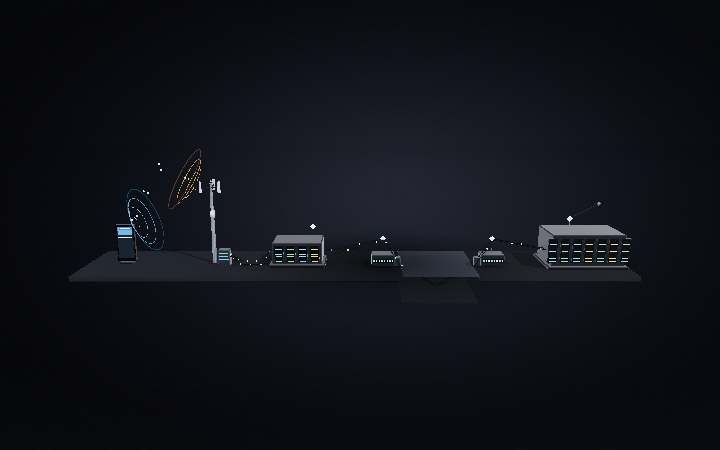
1 · The whole journey
Tapping a web address looks instant, but your request makes a long physical trip. It leaves your phone as a radio wave to the nearest cell tower, is carried by fibre to your operator's core network and out onto the public internet, then hops router to router across the world — often under the ocean through submarine cables — to a data centre, which sends the page all the way back. The whole round trip usually takes only a few hundred milliseconds. A note on scale: this scene is a schematic, not to scale. In reality your phone is about 15 cm tall, a cell tower 15–60 m, and a data centre the size of several football fields — and the horizontal distances are enormous: the tower is up to a few kilometres away, and the data centre answering you may be hundreds or thousands of kilometres off, often across an ocean via cables that run 6,000–13,000 km end to end. We've compressed those distances and enlarged the phone so every stage stays readable.
Step 02 of 11
2 · You tap the URL
It starts on the glass in your hand. You type or tap a web address — say example.com — into the browser's address bar and hit go. To your phone that name means nothing yet: computers find each other by numeric IP address, not by name. So before anything can be sent, the browser has to discover which machine on the internet "example.com" actually refers to.
Step 03 of 11
3 · Finding the address (DNS)
The phone asks a DNS resolver — usually your ISP's, inside the mobile core — to turn the name into an IP address. If nobody has looked it up recently, the resolver walks the naming hierarchy: a root server points it to the server for ".com", which points it to the domain's own authoritative nameserver, which finally returns the numeric address. The answer is cached at every level so the next lookup is near-instant.
Step 04 of 11
4 · Onto the air, up to the tower
Now the phone can send. Its modem wraps the request into IP packets, encrypts them, and error-codes them; the RF chip and antenna modulate those bits onto a radio carrier and radiate them outward. The wave races to the nearest cell tower — the base station, an eNodeB on 4G or a gNB on 5G — exactly the same air interface a phone call uses, but now it's carrying data, not voice.
Step 05 of 11
5 · Through the core, onto the internet
From the tower, buried fibre backhaul carries your packets to the operator's mobile core network — the packet core (EPC on 4G, 5GC on 5G). Its internet gateway is the actual door onto the public internet: it checks your session, then hands the packets off to the global network of interconnected routers. Your request is no longer "on the phone network" — it's out on the open internet.
Step 06 of 11
6 · Routed across the world
No single wire connects you to the site. Instead the packet hops from router to router: each one reads the destination IP, consults tables that BGP (the Border Gateway Protocol) keeps updated between networks, and forwards it one hop closer. Long-haul legs travel as pulses of light through fibre-optic cable at about two-thirds the speed of light — roughly 200,000 km per second — including submarine cables on the ocean floor, which carry almost all traffic between continents. The scale here is vast: this little ocean stands in for real crossings like the ~6,600 km transatlantic and ~11,000 km transpacific cables, and a single request can travel well over 10,000 km each way — yet even a round trip to the far side of the planet adds only about 200 milliseconds.
Step 07 of 11
7 · Handshake and encryption
Before any web data flows, the two ends agree how to talk. A TCP three-way handshake — SYN, then SYN-ACK back, then ACK — opens a reliable connection, and a TLS handshake then negotiates secret keys so everything is encrypted: that's the padlock in the address bar. Crucially, the far end is usually not the origin server but a nearby CDN edge node — a cached copy of the site kept close to you to shorten every round trip.
Step 08 of 11
8 · The data centre answers
Inside the data centre, a web server receives your HTTP request. If the edge already has the page cached it replies immediately; otherwise an application runs your request — often querying a database — and assembles the response: the HTML skeleton of the page plus its CSS styles, JavaScript, images and fonts. All of that is packaged back up into packets, addressed to your phone, and pushed back out onto the network.
Step 09 of 11
9 · The reply races back
The response now retraces the entire journey in reverse: out of the data centre, back through the routers and undersea fibre, into your operator's core, out to the serving cell tower, and down as a radio wave to your phone. It doesn't arrive all at once — the page streams in as a series of packets, and the browser starts working with them the moment the first ones land.
Step 10 of 11
10 · The browser paints the page
The last stage happens on the phone itself. The browser parses the HTML into a DOM tree, applies the CSS to work out how everything should look, runs the JavaScript, and lays the whole thing out — then paints the coloured pixels onto the screen. Text, images and buttons appear, and the page you asked for is finally there. From tap to render, it all happened in a fraction of a second.
Step 11 of 11
11 · All in half a second
Address lookup, radio uplink, core network, dozens of router hops, an ocean crossing, a secure handshake, a data centre building the page, and the whole thing streaming back to be painted on your screen — every stage happened in the time it took your finger to leave the glass. Billions of these round trips are crossing the planet at this very moment, over the same shared web of towers, fibre and routers.