How a QR Code Works
A QR code is a page of writing with the ruler printed on it. Three 7×7 squares tell a camera where the code is and which way up it is, a dotted line down the middle tells it how big a module is, and the rest is your message run through Reed–Solomon so a third of it can be scratched off and still read. This one is a real Version 2 code, generated module by module in the browser.
Step 01 of 09
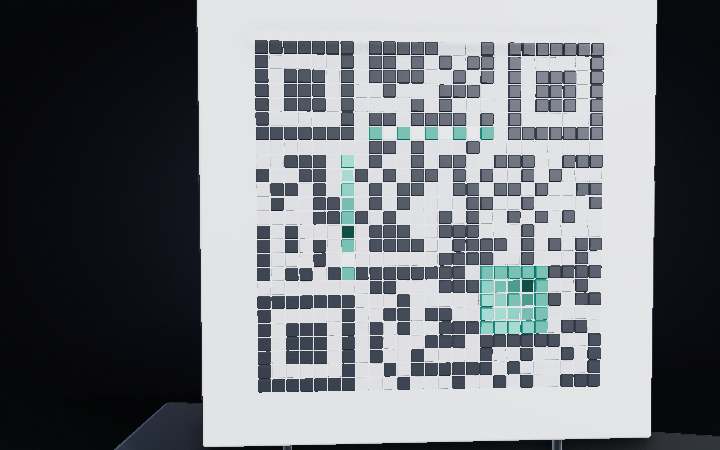
1 · A page with the ruler printed on it
This is a real QR code, moulded into a plate: 25 rows of 25 squares, each square a module, each module black or white. It carries fourteen characters — the address of this site. What makes it different from the barcode on a cereal box is that a barcode assumes you will hold the scanner straight; a QR code assumes you will not. Most of what you are looking at is not the message at all. It is the scaffolding a camera needs to work out where the code is, how big it is, and which way up you are holding it.
Step 02 of 09
2 · Three eyes, and one deliberate gap
The three big squares are finder patterns, and they are the first thing any scanner looks for. Run a line through the middle of one and you cross black, white, black, white, black in widths of 1 : 1 : 3 : 1 : 1 — and that holds no matter which way you cut through it, or how far away you are, or how tilted the code is. Masahiro Hara picked that ratio in 1994 by counting run-lengths in piles of printed matter and choosing the sequence that almost never turned up by accident. Three corners get one; the fourth is left bare on purpose, so the code cannot be read upside down.
Step 03 of 09
3 · The ruler and the tripod
Once it has the three eyes, the scanner knows roughly where the code sits — but not yet how wide one module is, and printed codes are never quite square in a photograph. The dotted line running between the finders is the timing pattern: strict black-white-black-white along row six and column six, so counting it gives the exact module pitch. The small 5 × 5 square near the bottom-right is an alignment pattern, and it is the one that saves you when the code is on a curved bottle or shot at an angle. Version 1 has none; version 2 has one; version 40 has forty-six.
Step 04 of 09
4 · Fifteen bits that have to survive
Wrapped around the finders is a strip of fifteen modules called the format information. Five bits of it are the actual content — two for the error-correction level, three for which mask was used — and the other ten are a BCH code protecting those five. Then the whole fifteen is XOR-ed with a fixed pattern so it can never come out all-white, and written into the code twice, in two places far apart. It has to be this paranoid: nothing else in the code can be read until these bits are, so a scanner that loses them loses everything. The one module sitting directly above the bottom-left strip is dark in every QR code ever printed, whatever it says.
Step 05 of 09
5 · Turning the message into bytes
Now the message. Four bits say which alphabet is coming — 0100 means raw bytes — then eight bits give the length, fourteen. After that it is just ASCII: w is 01110111, h is 01101000, and so on for all fourteen characters. That comes to 124 bits, four zeros of terminator round it up to 128, and 128 bits is exactly sixteen codewords of eight bits each. Sixteen is also exactly what a version 2 code at this correction level has room for, which is why fourteen characters needs this size of code and a fifteenth would not fit.
Step 06 of 09
6 · Twenty-eight spare codewords
Sixteen codewords of message get twenty-eight codewords of Reed–Solomon behind them — nearly two check symbols for every one of yours. That is level H, the strongest of the four, and it is why the code you are looking at is more correction than content. Reed–Solomon fixes half its check symbols, so fourteen of the forty-four can be wrong or missing and the message still comes out bit-perfect. Drop a sticker on it and watch: the buried codewords go red on the rail, the spares rebuild them, and the scan still lands. This is also why companies get away with printing a logo in the middle of one.
Step 07 of 09
7 · Snaking the bits into the grid
Forty-four codewords is 352 bits, and they go into the code in a fixed path: two-module-wide columns starting at the bottom-right corner, zig-zagging up the pair, then down the next pair, then up again, all the way to the left edge. Anything already spoken for — a finder, the timing line, the format strip — is stepped over, and the column that would land on the vertical timing pattern is skipped entirely. Version 2 leaves seven modules over at the end, which are simply filled with zeros and ignored.
Step 08 of 09
8 · Eight patterns, and a scoring round
A raw code often comes out with big blank fields or long stripes, and a camera reads those badly — worse, a run of dark modules can accidentally imitate a finder pattern and send the scanner hunting in the wrong place. So the encoder XOR-s the message area with one of eight fixed patterns, tries all eight, and scores each on four penalty rules: runs of five or more, solid 2 × 2 blocks, anything resembling the 1 : 1 : 3 : 1 : 1 finder run, and how far the black-to-white balance drifts from even. This code scored 445 on mask 2 — every third column flipped — against 692 for the worst. Only the message area is touched; the finders and timing lines are never masked.
Step 09 of 09
9 · What the camera actually does
Your phone is not reading squares. It thresholds the image to black and white, hunts every row for that 1 : 1 : 3 : 1 : 1 run, and when three of them turn up it has three corners of a square — enough to work out the fourth, undo the perspective, and lay a grid over the picture using the timing pattern for spacing. Then it reads the format bits, learns the level and the mask, XOR-s the mask back off, walks the same snaking path in reverse, and hands 352 bits to Reed–Solomon. From pointing the camera to opening the link is usually under a tenth of a second.