How a Touchscreen Works
A sheet of glass with no moving parts that knows exactly where you touched it — how an invisible grid of diamonds measures a capacitance a millionth of a millionth of a farad wide, and why your finger makes the signal go down.
Step 01 of 08
1 · A machine with nothing moving in it
No switch closes here. No contact wipes, no dome collapses, nothing wears out — this whole machine is a sheet of glass over a sandwich of films. Everything it knows about your finger, it works out from an electrical measurement so small it is easier to state in millionths of a millionth of a farad.
Step 02 of 08
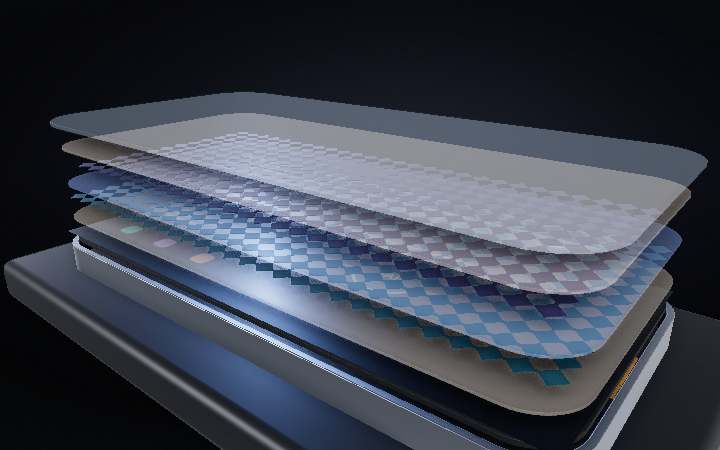
2 · Seven layers, and most of them are films
Lift it apart and there is barely anything there: chemically strengthened cover glass about 0.6 mm thick, a film of optically clear adhesive, then two sensor layers separated by a whisper of dielectric, more adhesive, and the display underneath. The sensor films are drawn far thicker here than they really are — the conductive layer itself is around a hundred nanometres, roughly a thousandth of a hair.
Step 03 of 08
3 · The grid you have been looking through
Both sensor layers are etched into interlocking diamonds of indium tin oxide — an oxide that conducts electricity and passes light, which is why you have never once noticed it. One layer chains its diamonds across into thirteen drive rows; the other chains them the other way into twenty-eight sense columns. That is 364 crossings, five millimetres apart. Tinted here; invisible in the real thing.
Step 04 of 08
4 · Every crossing is a tiny capacitor
Close the stack and push in on one crossing. The controller pulses the drive electrode; charge fringes off it, arcs up through the cover glass and lands on the sense electrode alongside. That coupling is the entire measurement — about three picofarads, and left alone it is rock steady, all day, at every one of the 364 crossings.
Step 05 of 08
5 · A touch makes the signal go down
This is the part almost everyone has backwards. A fingertip is a soft conductor wired to a body that carries roughly a hundred picofarads to ground, so parking it over the crossing does not add anything — it intercepts the arcs that were heading for the sense electrode and drains them away. The coupling falls by a few hundred femtofarads. That missing charge is the touch.
Step 06 of 08
6 · The whole sheet, 120 times a second
The controller cannot listen everywhere at once, so it drives one row at a time and samples every column simultaneously — one row, twenty-eight readings, next row. All thirteen rows take about eight milliseconds, then it starts over. What comes out is not a coordinate. It is a small picture of how much capacitance each crossing just lost.
Step 07 of 08
7 · A blur becomes a coordinate
Take the tip away and this is all the controller ever has. A fingertip flattens to a contact patch around nine millimetres across — wider than the five millimetre grid — so several crossings dip together, by different amounts. Weight their positions by how much each one dropped and the answer lands far finer than the mesh it came from: a coarse grid of 364 nodes resolving a touch to a fraction of a millimetre.
Step 08 of 08
8 · Why a glove kills it stone dead
Glass back on, screen live. The bare tip lands and the screen answers at once — nothing pushed, nothing clicked, just a few hundred femtofarads quietly going missing from one corner of a grid you cannot see. Then the same tap goes in through a dry glove, and a millimetre of fabric holding the conductor off the field is the whole difference. The sheet still scans, the controller still listens, and it hears nothing at all.