How a Website Works
A website is two computers and a conversation. One of them is in your hands; the other is a metal box in a rack somewhere, and it has never heard of you. Between them sits a leased name that points at a number, a request small enough to fit in a text message, a database that finds one row out of millions without reading the rest, and a browser that turns the answer back into pixels — usually before you have finished letting go of the key.
Step 01 of 09
1 · Two computers and a cable
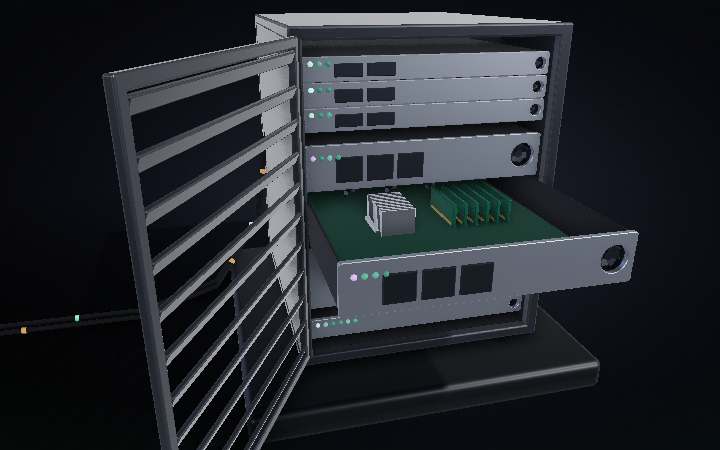
Everything you have ever called a website is this. A machine in front of you, a machine you will never see, and a conversation between them that is usually over in a third of a second. Your laptop holds none of the site — no text, no pictures, nothing. It holds a browser, which is a program for asking. The metal box on the right holds the actual files and the actual data, and it has never heard of you. Between them floats the only part that belongs to neither: the name. A note on scale — the cabinet here is a 12U, about waist high. Racks in a real data centre are 42U, over three times their own width tall, and there are thousands of them in rows.
Step 02 of 09
2 · The name is rented, and it points at a number
You do not buy a domain. You lease it, a year at a time, through a registrar — and the registry that files it does not store your website at all. It stores one thing: which nameservers speak for your name. Those nameservers hold the actual address, a number like 203.0.113.42. So before your browser can send anything, it has to ask: resolver, then the root, then the .com registry, then the nameserver that finally answers. That is why moving your site to a new host means repointing a name rather than buying a new one — and why the change takes hours to show up everywhere. Every answer along the way is cached until its time-to-live expires.
Step 03 of 09
3 · The request is smaller than a text message
Now your browser has an address, and it sends the smallest thing in this whole story: a method, a path, and a handful of headers. GET /index.html — fetch me that file, here is who I am and what formats I can read. But it cannot just shout it down the wire. First the two machines shake hands: three messages to open a reliable connection, then a longer negotiation to agree on encryption keys. Around eight round trips before one byte of your page is asked for. That is the padlock in the address bar — not decoration, the receipt for a conversation that already happened.
Step 04 of 09
4 · The web server answers what it can off disk
Open the cabinet and the first thing your request meets is the web server — the top sleds, running something like nginx. Its job is narrow and fast: if you asked for a file that simply exists, it hands the file back and the conversation is over. A logo, a stylesheet, the JavaScript bundle. No thinking required. There are three of them because one machine is a single point of failure, and because the same request can go to whichever is least busy. But the moment you ask for something that depends on who is asking — your name, your cart, your feed — this tier cannot answer. It passes the request deeper.
Step 05 of 09
5 · The backend is where your code actually runs
Pull the application sled out on its rails and there is no mystery inside — a processor under a heatsink, memory beside it, fans dragging air front to back. This is the backend. When a request arrives here, a program you wrote wakes up, looks at the path and at whatever proves who you are, and decides what this particular visitor should see. That decision is the whole reason the tier exists: the same URL has to produce a different page for every person who asks. But the code does not know anything by itself. To answer, it has to go and look something up.
Step 06 of 09
6 · The database finds one row without reading the rest
The bottom unit is the database, and this is the part that should feel impossible. The table might hold forty million rows. Your query wants one. It does not look at the other thirty-nine million — watch the head: it does not sweep the disc, it goes straight to a track and stops. An index keeps the keys sorted in a branching tree, so finding a row is a handful of hops down that tree rather than a walk through the whole table. About thirty steps for a billion rows. The row comes back up to the application, which drops it into a page and hands the finished thing to the web server.
Step 07 of 09
7 · 200 OK, and the first 14 kilobytes
The answer comes back shaped like the question: a status line, some headers, then the body. 200 OK means the server understood and is sending what you asked for. The headers say what the body is and how long it runs. And the first slice that arrives is only about 14 kilobytes — not because the connection is slow, but because a fresh connection deliberately starts cautious and doubles its pace only once it sees packets getting through. Which is why the top of a page so often appears before the rest: the browser starts building with whatever it has.
Step 08 of 09
8 · The frontend builds the page out of three layers
What arrived is text. Turning it back into a page takes three passes, and you can watch them land. The HTML becomes a tree of nodes — the structure, the nesting, what contains what. The CSS becomes a second tree of rules, and nothing can be drawn until it is complete, because a rule further down can still overrule one above. Combine the two and the browser knows what is visible and how it should look; then it works out where every box sits, and only then paints pixels. JavaScript runs on that same single thread, which is why one heavy script freezes the whole page. The budget for all of it is under 17 milliseconds a frame.
Step 09 of 09
9 · Run it
Name to number, handshake, request, web server, application, database, and all the way back to be rebuilt as pixels. Every tap of every link you make does this, and the only part you were ever meant to notice is the last one.